The email alert scams are on the rise. I received four of them in as many days. In this short post, we discuss how to recognize and avoid them.
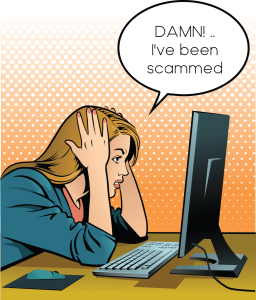
If you're like me, you receive a lot of emails. Scattered among those emails are dangerous "phishing" emails.
The goal of these emails is to prompt you to click a hyperlink, which gives hackers access to your computer.
The emails are made to look official and come from a company with which you may actually have an account. You should always be suspicious of any email that prompts an action, either one that confirms the money you just spent (which, of course, you didn't) or warns of a penalty if you don't upgrade now.
Below, I've shared a few I have received, and I also provide steps you can take if your data has been breached. Some that I've received include domain name registration and confirmation of an Amazon purchase.
EMAIL SCAM ALERT
You'll receive a branded email -- Amazon confirming your recent purchase. Of course, you didn't make the purchase, so you panic that you were hacked or someone fraudulently used your account. you click on the Order# hyperlink to see what it is all about. Once you've clicked the link, they've won.
In the case of the email I received, it was branded from Amazon and stated: "Thank you for shopping with us. We’d like to let you know that Amazon has received your order, and is preparing it for shipment. Your estimated delivery date is below."
Shipping Confirmation
Order #305-4473028-5437651 (this was hyperlinked, though I removed it)
If you need further assistance or to Cancel your order, Call Our Customer Service +1 (805) 500-6557 .
| Arriving: TomorrowYour shipping speed: Standard Delivery | Your package was sent to: David H Banns 1360 Rain tree Lane Wellington, Florida 33414, US |
THE NORTON SCAM
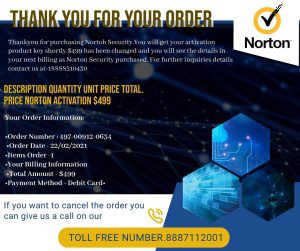
This one is just a graphic thanking you for your order, with a "if you want to cancel call us at _______
Why Security Software Updates Matter
Think of security software updates as the digital equivalent of giving your front door a sturdier lock every time crooks figure out a new trick. When you keep your antivirus, Windows Defender, or Norton up to date, you’re fortifying your devices against the latest schemes—including phishing scams that aim to sneak in by pretending to be trusted brands.
- Automatic Updates: Set your laptops, desktops, and phones to update security software automatically. This way, even when scammers cook up a new “Microsoft” or “Norton” fraud, your device has the latest defenses in place—blocking suspicious web links, attachments, and malicious downloads that phishing emails often carry.
- Critical Protection: Those annoying update prompts you sometimes ignore? They’re actually patching vulnerabilities that could otherwise hand scammers the keys to your digital life.
In short: never skip those updates. They’re your first line of defense against email scams and phishing attempts that look all too convincing.
INCOMING EMAIL RESPONSE OPTIONS
When you receive an email that (A) confirms an action taken by you (i.e., you made a purchase), or (B) instructs you to take action or be penalized, you should be careful.
Another scam claims this is your final notice before your domain name expires. In this case, option two below is always recommended.
You can proceed in one of two ways.
OPTION ONE
First, check the "From" email address to assess whether it is real. This is not the same as the "From" name, which can easily be manipulated. In the case above, the email said From Amazon, but the email came from amazonpurchase@gmail.com. @gmail.com is not Amazon. However, some email phishing is more sophisticated than others.
For example, some time back like this: onlinebanking@ealerts.bankofamerica.com.
OPTION TWO
The second and more surefire way to avoid clicking on scam emails is to simply go to the account directly, log in, and see if there are any notifications. If not, then the email was a scam.
Additional Ways To Protect Yourself From Phishing Attacks
Scammers are always trying new tricks to sneak their emails past your spam filter, so adding extra layers of protection is smart. Here are a few key steps you should be taking alongside the options above:
- Keep your security software updated
Make sure your computer and phone are running the latest versions of their security software. Most updates patch new vulnerabilities, so set your software to update automatically if possible. - Use multi-factor authentication whenever available
Many accounts let you add an extra step when logging in—like entering a code sent to your phone or using your fingerprint. This makes it much harder for scammers to get in, even if they have your password. - Back up your data
Regularly back up important files, whether to an external drive or a secure cloud service. If a scammer ever gets into your device or locks you out, you’ll still have your data.
Being diligent and layering these habits with the options above can help ensure you’re not the next victim of an email alert scam.
THE IMPORTANCE OF BACKING UP YOUR DATA
Now, let’s talk about one final, but crucial, defense—backing up your data. Why? Because even the best of us can slip up. All it takes is one click on the wrong link, and suddenly you’re dealing with ransomware or malware locking you out of your files.
Imagine you wake up to find your computer held hostage: a digital version of a burglar in your house demanding payment before you get your family photos or tax returns back. If you’ve taken the time to back up your data—either on an external hard drive or by using a cloud service (think Google Drive or Dropbox)—that threat loses its teeth. No paying ransom, no panic. Just wipe your machine, restore your backup, and carry on with your day.
The same holds true for your smartphone. Back up everything important, regularly. That way, if you fall for a phishing trick, your digital life isn’t thrown into chaos.
Backing up isn’t just smart—it’s your insurance policy against cyber crooks.
What To Do If You Suspect Your Information Has Been Compromised
So, let’s say worst case scenario—you think you’ve been duped, and your personal info (like your Social Security, bank account, or credit card) may have fallen into the wrong hands. Don’t panic, but do take action:
- Change your passwords immediately. Start with your email, then move on to any affected accounts—banking, Amazon, PayPal, Netflix, you name it. Use strong, unique passwords for each.
- Contact your bank and credit card providers. Let them know what happened so they can watch for suspicious activity, freeze accounts if necessary, and issue new cards.
- Monitor your financial statements. Keep a close eye on your bank and credit card activity for any unfamiliar charges. If you see anything fishy, report it right away.
- Notify the credit bureaus. Consider placing a fraud alert or even freezing your credit. TransUnion, Equifax, and Experian can help lock things down if needed.
If you think you accidentally clicked a shady link or opened a sketchy file, don’t just hope for the best—take these steps:
- Update your security software (yes, that stuff you keep postponing). Make sure your antivirus is up to date.
- Run a complete scan. Let your software sweep your system for any nasties and remove anything suspicious.
- Restart your device after the scan, just to ensure anything lurking gets properly booted.
In short: act fast, stay alert, and don’t underestimate the importance of a strong, unique password. It’s your digital shield!
Reporting Phishing Attempts
If you spot a suspicious email or text, you can actually help stop scammers in their tracks. Here’s how to report these tricksters and make the digital world just a bit safer:
- For phishing emails: Forward the message to the Anti-Phishing Working Group at reportphishing@apwg.org. Their team collects these emails to track, investigate, and shut down malicious sites.
- For scammy texts: Send the message along to SPAM (7726). Most smartphones let you forward a text to this number, and it helps mobile carriers block future attacks.
- For good measure, many email providers and mobile services also have their own “Report phishing” or “Report spam” buttons, which gets that junk quarantined and strengthens their filters.
Reporting these scams only takes a few seconds, but your action might help save someone else from getting caught in the net. Be cautious, stay savvy, and don’t let the phishers reel you in.
Bruce is a thought leader in marketing -- specifically SEO-AEO-GEO-Business Listings, and content development & marketing.
Categories
Recent Posts
- Beyond the Prompt: 3 Reasons Raw AI Fails the 2026 Authority Matrix
- WordPress Maintenance: Elite DFY Support & Technical Stewardship
- Proven Small Business Marketing: Boost 2026 Visibility
- AI for Small Business: Scaling Service with the 2026 Authority Matrix
- AI Search Optimization: The Proven 2026 Authority Matrix for AEO & GEO
About us and this blog
We are a digital marketing company with a focus on helping our customers achieve great results across several key areas.
Request a free quote
We offer professional SEO services that help websites increase their organic search score drastically in order to compete for the highest rankings even when it comes to highly competitive keywords.
 | Thank you for Signing Up |


More from our blog
See all posts